
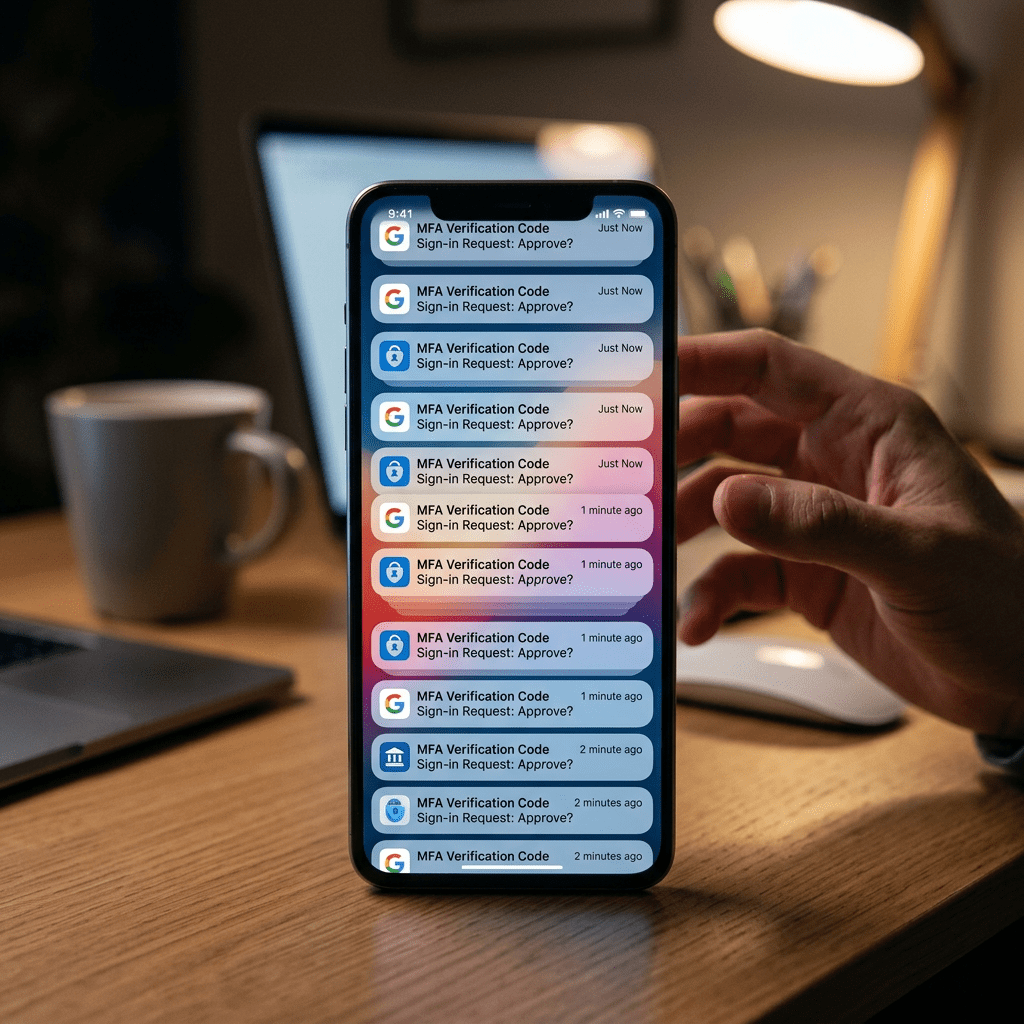
Multi-Factor Authentication, or MFA, is a simple security measure. After entering your password, you are asked for a second step, such as a code or a notification on your phone, to confirm that it is really you. It is one of the most useful protections available today because even if someone steals your password, they should still be blocked from entering your account. (Australian Cyber Security Centre (ACSC) 2025)
This is where MFA fatigue (push bombing), the goal is not to hack the technology directly. The goal is to pressure, confuse, and wear you down until you approve one of the requests as they keep appearing again and again, they become annoying, distracting, and stressful then some people begin to think there must be a technical issue; others simply want the interruptions to stop. In that moment, one accidental tap on “Approve” can give an attacker exactly what they need.(Microsoft Security 2025)
In many cases, the attacker already has the victim’s password. This can happen because of phishing emails, reused passwords, or data breaches. Once they have that first piece, they begin sending repeated login attempts. Each attempt triggers another MFA request. If the user eventually accepts one, the attacker can enter the account. What looks like a harmless notification becomes the final step of the breach.
A well-known global example came from the Uber breach, where attackers used a combination of stolen credentials, repeated MFA requests, and social engineering to gain access to internal systems. (Uber2022)
It also helps to use stronger forms of authentication where possible. Number matching, for example, is more secure because it forces the user to confirm a number shown on the login screen rather than blindly tapping approve. Authenticator apps are generally better than SMS, and device-based or biometric options can add another layer of protection. Just as important, if you start receiving repeated MFA requests, you should change your password immediately because it may already be compromised.(Microsoft Security 2025 )
There are three actions worth taking today.
- First, review your accounts and enable the strongest MFA option available, especially number matching if it is offered.
- Second, stop reusing passwords across different services, because one stolen password can be enough to trigger this kind of attack.
- Third, make a personal rule now: if you did not initiate the login, you will never approve the request.
MFA is still essential, and people should continue using it. But it is important to understand that security tools are not effective on their own. Attackers are adapting. In many cases, they are no longer trying to break the door down. They are trying to make you open it for them.
Fatiga de MFA: cuando demasiadas notificaciones se convierten en el ataque
La Autenticación Multifactor, o MFA, es una medida de seguridad simple. Después de ingresar tu contraseña, se te pide un segundo paso, como un código o una notificación en tu teléfono, para confirmar que realmente eres tú. Es una de las protecciones más útiles hoy en día, porque incluso si alguien roba tu contraseña, en teoría debería seguir bloqueado para entrar a tu cuenta.(Australian Cyber Security Centre (ACSC) 2025)
Aquí es donde aparece la fatiga de MFA (también conocida como “push bombing”). El objetivo no es hackear la tecnología directamente, sino presionarte, confundirte y desgastarte hasta que apruebes una de las solicitudes. A medida que las notificaciones siguen apareciendo una y otra vez, se vuelven molestas, distractoras y estresantes. Algunas personas comienzan a pensar que se trata de un problema técnico; otras simplemente quieren que las interrupciones se detengan. En ese momento, un solo toque accidental en “Aprobar” puede darle al atacante exactamente lo que necesita.(Microsoft Security 2025)
En muchos casos, el atacante ya tiene la contraseña de la víctima. Esto puede ocurrir por correos de phishing, reutilización de contraseñas o filtraciones de datos. Una vez que tienen esa primera pieza, comienzan a enviar intentos de inicio de sesión repetidos. Cada intento genera una nueva solicitud de MFA. Si el usuario finalmente acepta una, el atacante puede entrar a la cuenta. Lo que parece una notificación inofensiva se convierte en el último paso del ataque.
Un ejemplo global bien conocido fue el incidente de Uber, donde los atacantes utilizaron una combinación de credenciales robadas, múltiples solicitudes de MFA e ingeniería social para acceder a sistemas internos.(Uber2022)
También ayuda utilizar formas más robustas de autenticación cuando sea posible. El “number matching”, por ejemplo, es más seguro porque obliga al usuario a confirmar un número que aparece en la pantalla de inicio de sesión, en lugar de simplemente presionar “aprobar”. Las aplicaciones autenticadoras suelen ser mejores que los SMS, y las opciones basadas en dispositivos o biometría pueden añadir una capa adicional de protección. Igual de importante, si comienzas a recibir múltiples solicitudes de MFA, deberías cambiar tu contraseña inmediatamente, ya que podría estar comprometida.(Microsoft Security 2025 )
Hay tres acciones que vale la pena tomar desde hoy.
- Primero, revisa tus cuentas y activa la opción de MFA más fuerte disponible, especialmente el “number matching” si está disponible.
- Segundo, deja de reutilizar contraseñas entre diferentes servicios, porque una sola contraseña comprometida puede ser suficiente para iniciar este tipo de ataque.
- Tercero, establece una regla personal desde ahora: si tú no iniciaste el acceso, nunca aprobarás la solicitud.
El MFA sigue siendo esencial y las personas deben seguir utilizándolo. Sin embargo, es importante entender que las herramientas de seguridad no son efectivas por sí solas. Los atacantes están evolucionando. En muchos casos, ya no intentan forzar la entrada. Intentan que seas tú quien les abra la puerta.
References and sources
- Australian Cyber Security Centre (ACSC) 2025 : cyber guidance and advice on account security and MFA (https://www.cyber.gov.au/protect-yourself/resources-protect-yourself/personal-cyber-security-guides/protect-yourself-multi-factor-authentication)
- Microsoft Security 2025 : guidance on MFA fatigue and identity-based attacks (https://cdn-dynmedia-1.microsoft.com/is/content/microsoftcorp//microsoft/bade/documents/products-and-services/en-us/security/Identity-Protection-Guide-External-Working-doc-1-1.pdf)
- NIST Digital Identity Guidelines (SP 800-63): identity and authentication best practices
- Uber security update 2022 (https://www.uber.com/au/en/newsroom/security-update/)


Leave a Reply